Currently in beta — new features rolling out weekly.

Split expenses. Collect payments. Track every shared cost.

Split Mobile helps groups manage real-world expenses — receipts, rent, trips, events, productions, and shared purchases — with secure guest payments, wallet tracking, and simple bank withdrawals.

No subscription or paywall
Free standard withdrawals
Bank-level security
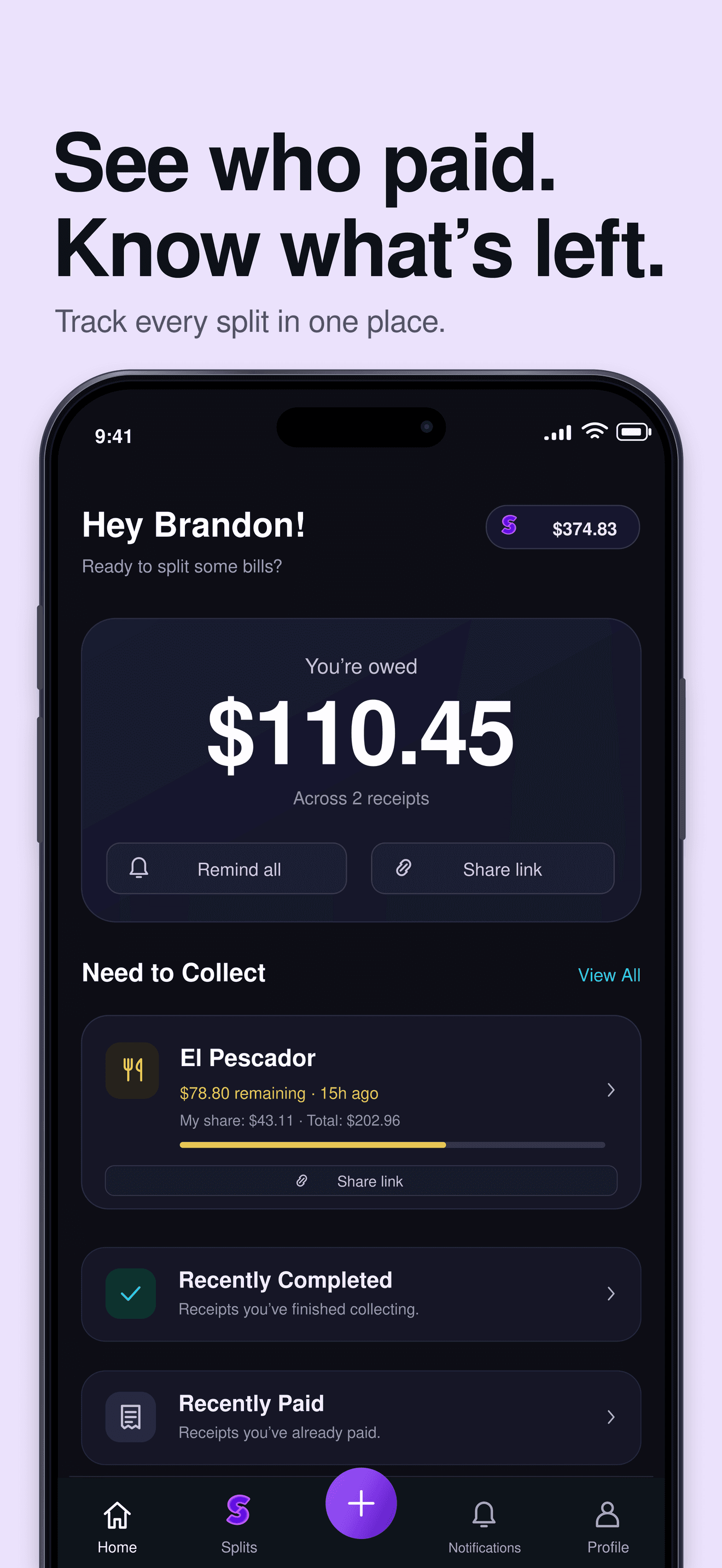
Split Mobile home dashboard showing how much you are owed, receipts left to collect on, and a share link to request payment.
$

What Split does

Split Mobile turns any real-world cost into an organized, collectible shared expense — from a dinner receipt to monthly rent.

Create any shared expense

Start from a scanned receipt, an uploaded screenshot, a manual expense, rent, a trip cost, or any group purchase.

Decide who owes what

Split by item, split evenly, or assign custom amounts so everyone owes exactly their fair share.

Send a secure link

Send a secure payment link to friends, roommates, guests, or group members — no app download required.

Collect and track

Collect payments into your Split wallet and keep every shared cost organized in one place.

Spreadsheets, receipts, and awkward reminders are broken.

Split keeps everyone organized with AI that handles the math, sends smart reminders, and helps you collect every shared cost.

The old way

Spreadsheet chaos

Manual calculations, version conflicts, and lost receipts

Awkward reminders

Chasing friends for money damages relationships

Complex group dynamics

Different reimbursement methods, currencies, and preferences

The Split way

AI-powered calculations

Perfect splits every time, no math errors

Organized collection

Collect payments and track who has paid, all in one place

Frictionless experience

Everyone covers their assigned share, relationships stay intact

Ready to see how it works? Here's the simple 3-step process.

How It Works

Four simple steps to create, collect, and organize any shared expense.

Step 1 — Create a split

Scan a receipt, upload a screenshot, or enter an expense manually.

Step 2 — Invite guests

Send a secure link so friends, roommates, guests, or group members can pay their share.

Step 3 — Track and collect

See who paid, track cash reimbursements, edit receipt items, and keep every shared cost organized.

Step 4 — Withdraw funds

Collected funds are available in your Split wallet. Standard bank withdrawals are free and typically take 3–5 business days.

Built for real-life shared expenses

From a single receipt to ongoing group costs, Split keeps shared spending organized and easy to collect.

Dinner & receipts

Split a dinner receipt by item or evenly, then collect everyone’s share in a few taps.

Groceries & household costs

Share groceries and everyday household costs without tracking who owes what on paper.

Rent & roommate expenses

Collect rent and recurring roommate expenses and keep a clear record of every payment.

Trips & travel groups

Keep flights, hotels, and activities organized so travel groups settle up with ease.

Events & celebrations

Coordinate contributions for parties, weddings, and celebrations in one shared place.

Productions & team expenses

Manage crew, vendor, and production expenses with clear, documented money movement.

Guest checkout — no app required.

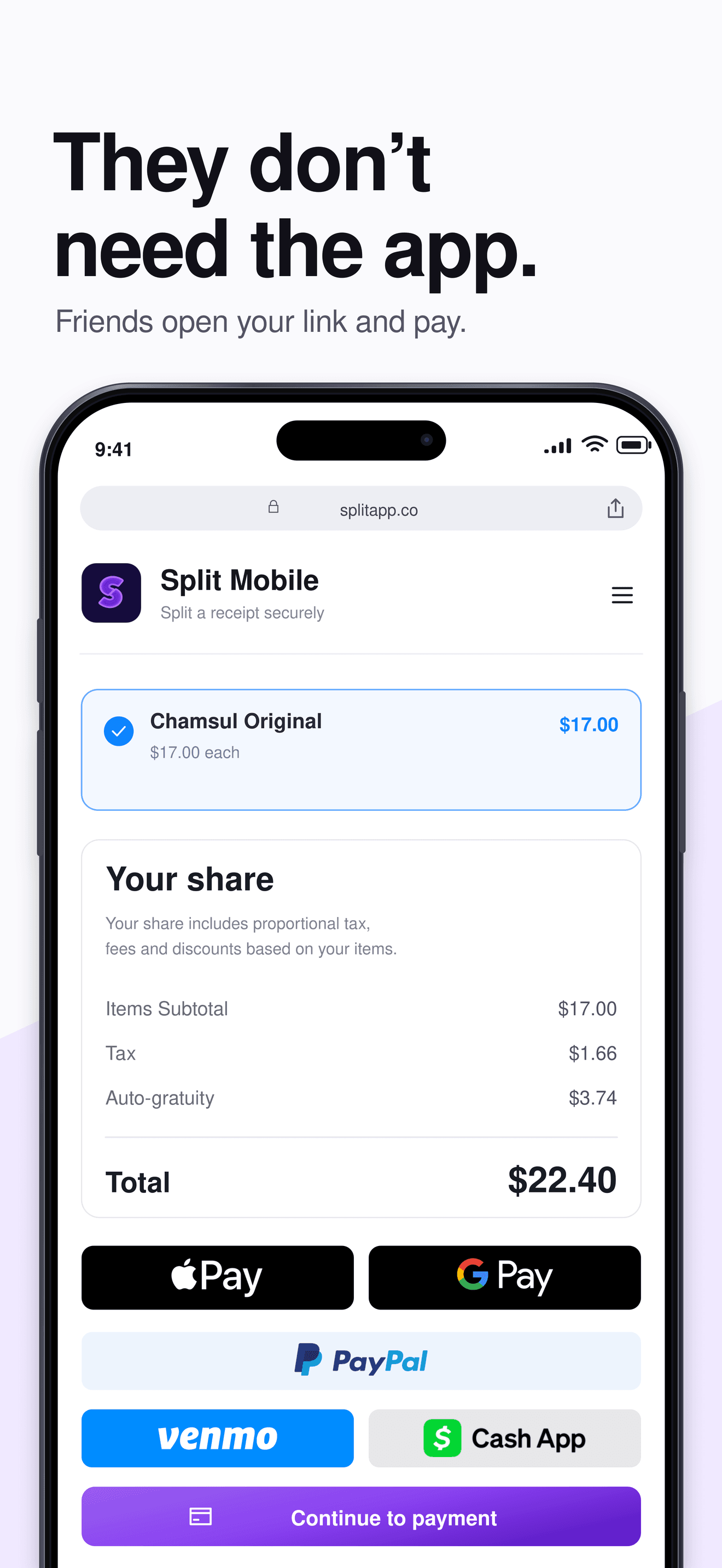
Guests don't need to download anything. Send a secure web link — they open it, view their share, and pay with Apple Pay, Google Pay, card, Venmo, Cash App, or PayPal where available. It's the easiest way to collect from friends, roommates, and group members, no signup required.

Split Mobile guest checkout — a friend opens a secure link, picks their items, and sees their share with tax, auto-gratuity, and Apple Pay, Google Pay, PayPal, and Venmo options.

Protected under U.S. Patent Pending Systems and Methods for AI-Powered Receipt Parsing and Shared Expense Reimbursements via External Participants (Split Mobile Inc.)

Wallet and payouts

Collect payments into your Split wallet and withdraw to your bank. Standard withdrawals are free and typically take 3–5 business days. Faster payout options may be available or rolling out where supported.

Collect into your Split wallet

Payments you collect land in your Split wallet, where you can review balances and track every shared cost.

Free standard bank withdrawals

Withdraw to your linked bank account whenever you’re ready. Standard withdrawals are free and typically take 3–5 business days.

Clear, predictable timing

Weekends and bank holidays don’t count as business days, so timing can vary slightly with your bank.

Faster options, where available

Faster payout options may be available or rolling out where supported. Any optional fees are shown before you choose them.

See the features that make this possible.

Built for Modern Shared Expenses

Simple, secure, and fast — with AI at the core.

Group expense management

Create or join a group to split shared expenses at restaurants, trips, events, rent, and everyday purchases — no manual calculations.

AI-powered receipt scanning

Snap a photo → AI itemizes the receipt, applies tax & tip, and helps assign items to each person automatically.

Flexible split controls

Split by item, split evenly, or assign custom amounts. Edit receipt items anytime so every share stays accurate.

Transparent tracking & cash logging

See who paid, who still owes, and log cash reimbursements so your group stays in sync without chasing money.

Wallet & bank withdrawals

Collect payments into your Split wallet and withdraw to your bank. Standard withdrawals are free and typically take 3–5 business days.

Secure & verified money movement

Built on secure payment infrastructure with encryption and transaction review to help keep your group's money safe.

Loading reviews...

Built with safety in mind

Split reviews unusual, high-value, or manual transactions to help protect users, prevent misuse, and maintain a secure payment experience. Larger transactions may require supporting documentation such as receipts, invoices, or proof of purchase.

Secure payment infrastructure

Split runs on secure, industry-standard payment infrastructure with encryption in transit and at rest.

Risk review on larger transactions

Unusual, high-value, or manual transactions may be reviewed to help protect users and prevent misuse.

Documentation when needed

Larger transactions may require supporting documentation such as receipts, invoices, or proof of purchase.

Security first, always

Your financial data deserves the highest level of protection. We use the same security standards as major banks.

Bank-level encryption

256-bit SSL encryption protects all data in transit and at rest

Same security standards as major banks

Stripe Financial Connections

Secure, read-only access to your bank account data

No passwords stored, no direct access

Least-privilege access

Minimal data collection with granular permission controls

Only access what's needed, when it's needed

Data retention policy

Automatic deletion of sensitive data after processing

Your data, your control

Ready to download the app? It's completely free to use.

Free to use

Split Mobile has no subscription, paywall, or hidden fee to use the core platform. Standard bank withdrawals are free. If optional paid features or faster payout options are available, any fees are clearly shown before you choose them.

No subscription or paywall to use the core platform
Free standard bank withdrawals
Split by item, evenly, or custom amounts
Secure guest checkout with no app required

Standard withdrawals

Free, and typically take 3–5 business days to reach your bank.

Optional features

Faster payout options or financial features may be available. Any fees are clearly disclosed before use.

Coming soon

We're building toward a complete shared expense platform. These features are in development or on our roadmap — not yet live.

Coming soon

Expanded payout options

Additional ways to move money out of your wallet, rolling out where supported.

Coming soon

Virtual cards for group expenses

Virtual cards for verified group expenses. Not live yet — part of our future roadmap.

How to Use Split Mobile

A super-simple, step-by-step guide. Scan a receipt, share a link, get reimbursed — even if your friends don't have the app.

2-minute setup
No app required for friends
Free standard withdrawals
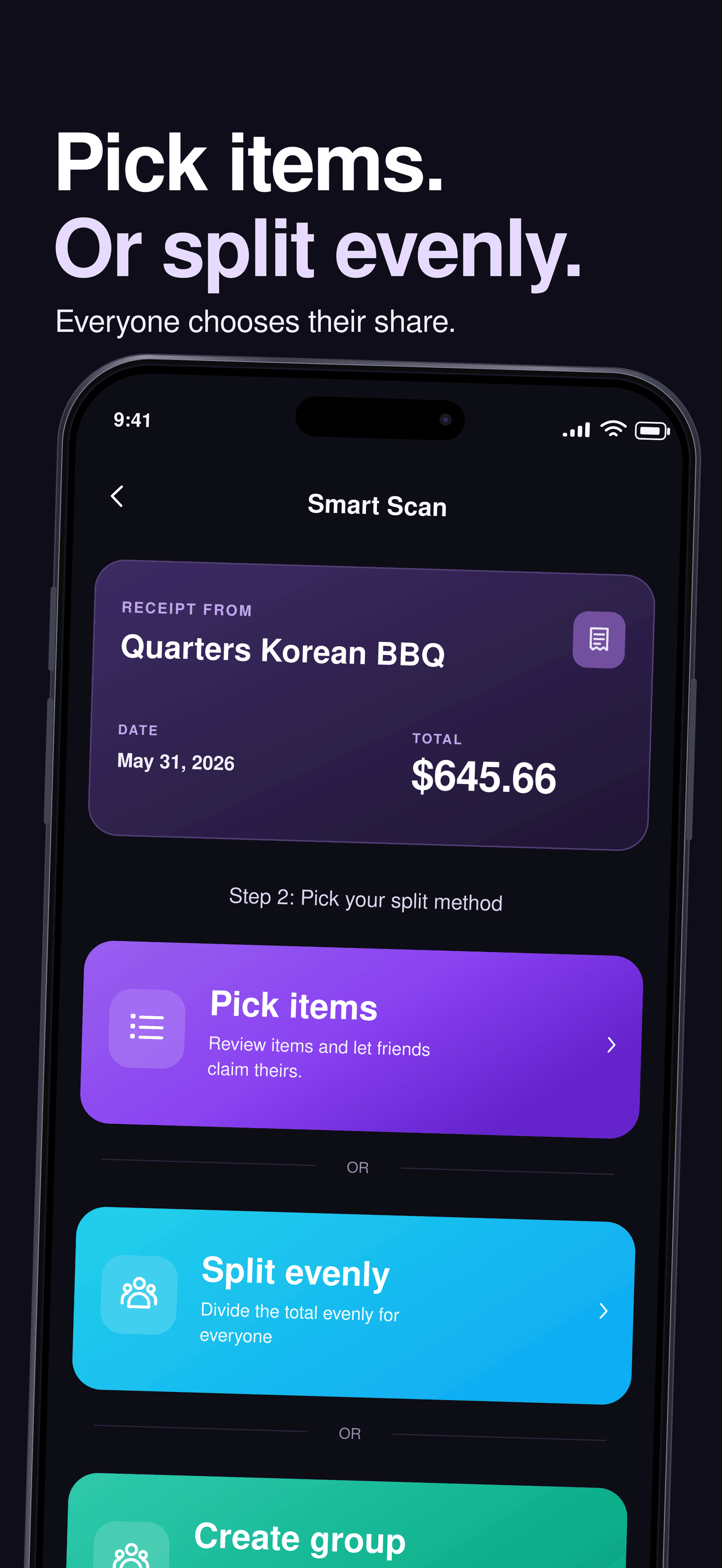
Split Mobile smart scan — after scanning a receipt, choose how to split it: pick items, split evenly, or create a group to settle up later.
📚
?

Download the Split app

Take expense splitting with you wherever you go. The Split mobile app puts the power of AI-driven expense management right in your pocket.Completely free to download and use.

Instant Splits

Create and settle expense splits in under 2 minutes

Smart Groups

Organize by trips, roommates, events, or custom groups

AI-Powered

Perfect calculations with intelligent fair-split algorithms

Split Mobile app splash screen with the Split logo.

Frequently asked questions

Everything you need to know about Split. Can't find what you're looking for? Contact our support team.

Yes. Split Mobile has no subscription or paywall to use the core platform. Standard bank withdrawals are free. If optional faster payout or financial features are available, any fees are clearly disclosed before use.

Still have questions?

Our support team is here to help. Get in touch and we'll respond within 24 hours.